AIML-501 · Artifact 2 · Visualizing neural networks

Inside a
Neural Network

Six parts, one diagram, and what happened when I changed them in TensorFlow Playground.

Scroll

How data flows through

Data goes in on the left, gets passed layer to layer, and an answer comes out on the right. The loss checks how wrong it was, and the optimizer sends that back to fix the weights.

x₁x₂ ffff ff ŷ INPUT LAYERHIDDEN LAYER 1HIDDEN LAYER 2OUTPUT Loss ŷ vs. right answer Optimizer: nudge every weight to lower the loss, repeat
Line = weight (thicker = stronger)fCircle = neuron + activationDashed = optimizer updating weights

What each piece does

01

Layers

Groups of neurons stacked in order. The input layer takes the raw data, hidden layers find patterns, and the output layer gives the answer.

In Playground: 2 hidden layers, 4 and 2 neurons
02

Neurons

Takes its inputs, multiplies each by a weight, adds them up with a bias, and runs the result through an activation function. One number comes out.

In Playground: each little square shows what that neuron "sees"
03

Weights

How strong each connection is. These are the numbers the network actually learns during training.

In Playground: line thickness, blue = positive, orange = negative
04

Activation functions

Adds a bend to each neuron's output so the network can learn curves. Without it, the whole network is just one straight line. Common ones: ReLU, tanh, sigmoid.

In Playground: the Activation dropdown
05

Loss function

One number that says how wrong the predictions are. Lower is better. Training is just trying to push this number down.

In Playground: Test loss and Training loss
06

Optimization algorithm

Looks at the loss and nudges every weight a little in the direction that makes it smaller (gradient descent). The learning rate is how big each step is.

In Playground: the Play button and Learning rate

Same network, one setting changed

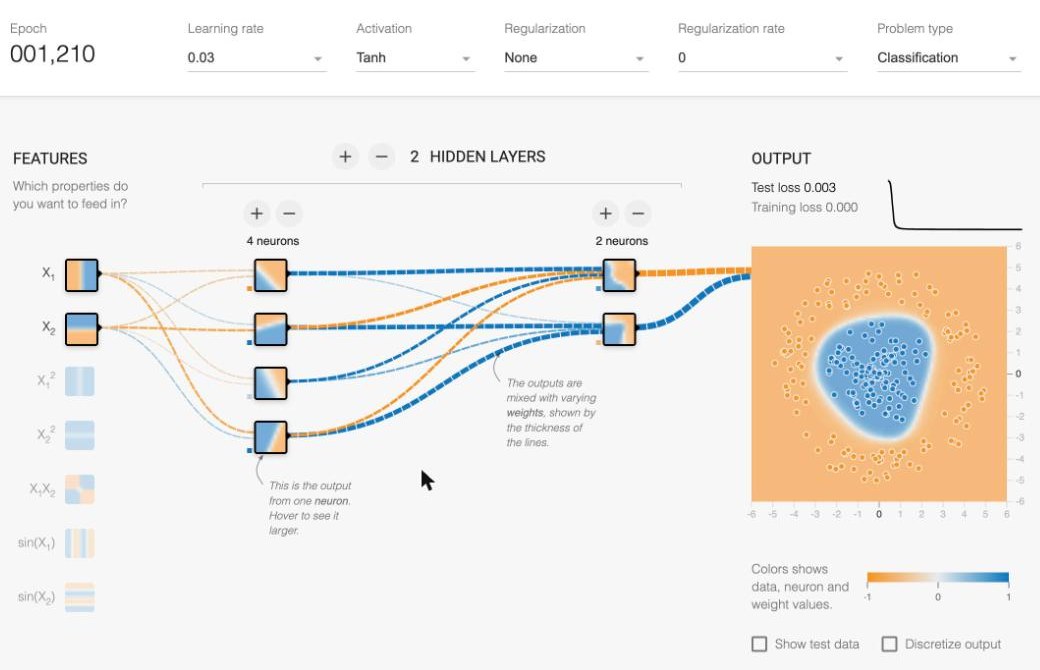
Circle dataset, 2 hidden layers (4 and 2 neurons), about 1,200 epochs each. The only thing I changed was the activation function.
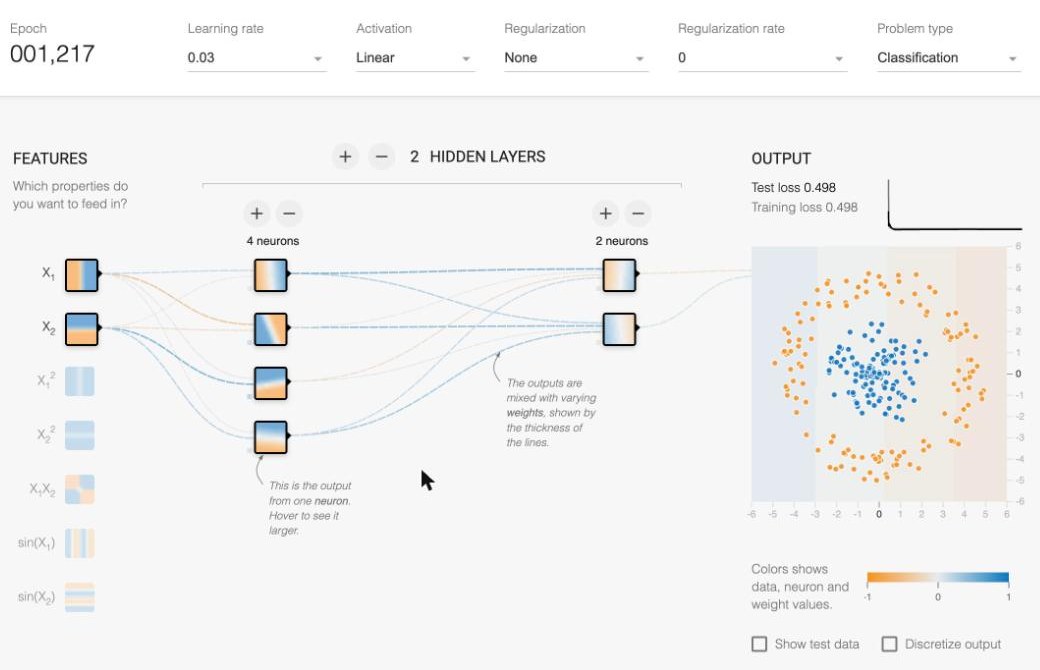
TensorFlow Playground with linear activation: straight boundary, test loss 0.498
Linear · test loss 0.498It can only draw straight lines, so it never wraps around the blue circle. Basically a coin flip.
TensorFlow Playground with tanh activation: circular boundary, test loss 0.003
Tanh · test loss 0.003Same neurons, same weights to start. The bend from tanh lets it draw a closed shape around the center.

Harder data needs a bigger network

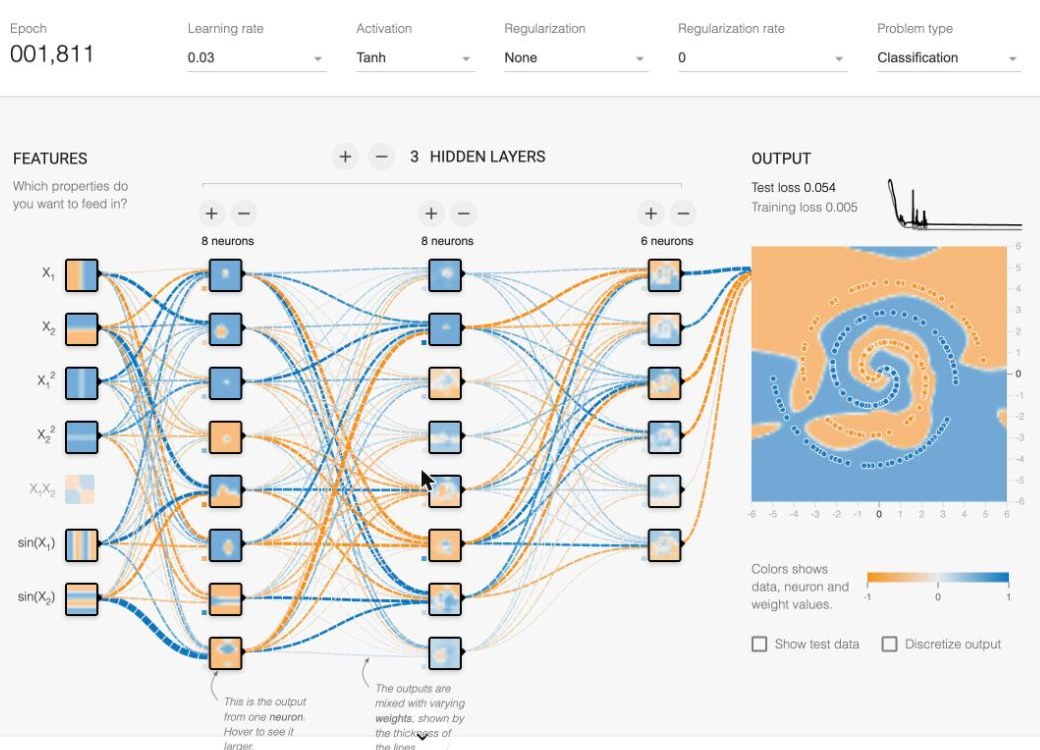
The spiral is the hardest dataset in the Playground. I tried the small network first, then added a layer, more neurons, and extra input features.
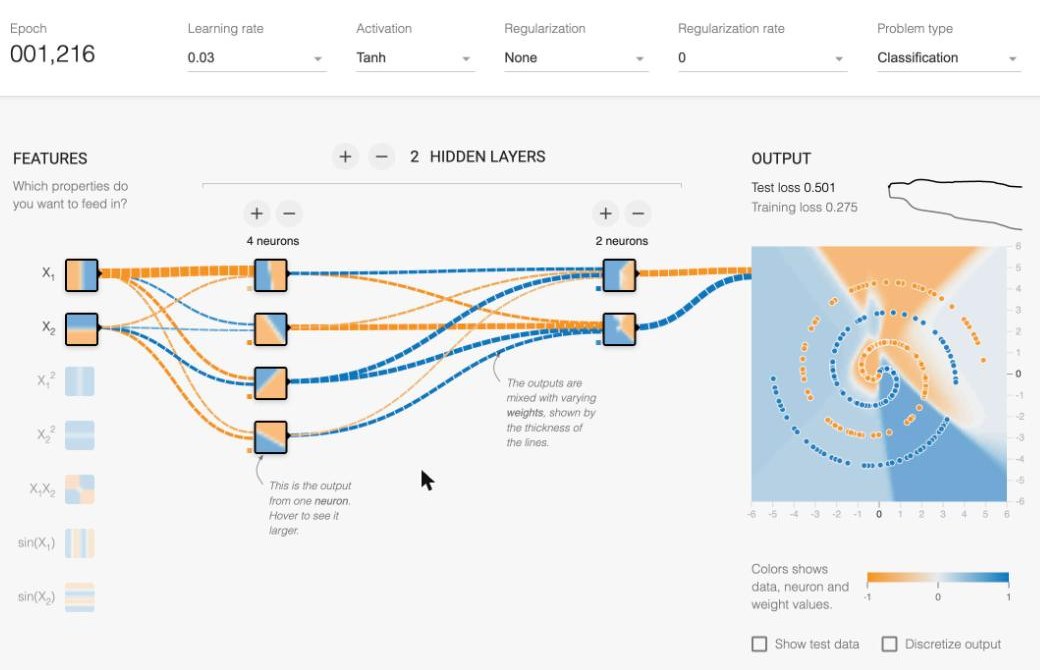
Small network on spiral dataset: test loss 0.501
4 → 2 neurons · test loss 0.501Training loss got to 0.275 but test loss stayed at 0.501. It was memorizing parts of the training points, not learning the spiral.
Deeper network 8-8-6 with extra features on spiral dataset: test loss 0.054
8 → 8 → 6 neurons + x², y², sin · test loss 0.054After 1,811 epochs it follows both arms of the spiral. The loss curve jumped around a few times before it settled.

What I took away

Seeing it beats reading it

I knew the definitions already. Watching the weights get thicker and the boundary bend in real time is what made them make sense.

Activation is not optional

One dropdown took the loss from 0.498 to 0.003. Without it, extra layers don't add anything.

Watch test loss, not training loss

The small spiral network looked like it was learning. The test loss said otherwise.

Layers hold the neurons. Weights connect them. Activation lets them bend. Loss keeps score. The optimizer fixes the weights.

Try it yourself: playground.tensorflow.org

About This Project

Introduction A visual guide to the six parts of a neural network, backed by my own experiments in TensorFlow Playground. Description An architecture diagram, a short explanation of each component, and two before/after experiments that show what happens when you change the activation function and the size of the network. Objective Go one level deeper than my AIML-500 neural network explainer: name the actual parts and show how each one changes the result. Process Trained small networks in TensorFlow Playground on the circle and spiral datasets, changing one setting at a time and recording the epochs and loss. Then drew the diagram to match the network I used and wrote up each component. Tools TensorFlow Playground, HTML, CSS, inline SVG. Value Gives a non-specialist a mental model of what is inside a network and why settings like activation and depth matter. Unique Value Every claim is tied to a real run with real numbers (0.498 vs 0.003, 0.501 vs 0.054), not just definitions. Relevance These are the same knobs engineers tune on production models. Knowing what each one does makes training decisions less of a guess. References Smilkov, D., & Carter, S. (n.d.). TensorFlow Playground. https://playground.tensorflow.org · Google. (n.d.). Machine Learning Crash Course: Neural networks. https://developers.google.com/machine-learning/crash-course · AIML-501, Indiana Wesleyan University.